
Let's Create Something Extraordinary
Our experts are ready to bring your vision to life with tailored solutions.
contact@yourbrand.com
+1 (555) 123-4567
Enterprise-grade solution for tracking employee attendance, productivity, and workforce management with advanced analytics and reporting.
Latest Version: 2.1.0The Attendance Management System (AMS) is a comprehensive web-based platform designed to streamline workforce management through automated attendance tracking, productivity monitoring, and insightful analytics. This enterprise solution helps organizations of all sizes optimize their human resource operations.
Support for facial recognition and fingerprint scanning for secure, contactless check-ins.
Interactive dashboards with live data visualization for instant workforce insights.
Fully responsive design with dedicated mobile apps for iOS and Android.
Machine learning algorithms detect attendance patterns and predict staffing needs.
End-to-end encryption, multi-factor authentication, and compliance with data protection regulations.
RESTful API for seamless integration with payroll, ERP, and other business systems.


| Component | Minimum | Recommended |
|---|---|---|
| Web Browser | Chrome 80+, Firefox 72+, Edge 80+, Safari 13+ | Latest version of Chrome or Firefox |
| Device | 1GB RAM, 1024×768 display | 4GB RAM, 1920×1080 display |
| Internet | 3G connection (1Mbps) | Broadband (10Mbps+) |
| Component | Small Deployment (<100 users) | Enterprise Deployment (>1000 users) |
|---|---|---|
| CPU | 2 cores | 8+ cores |
| Memory | 4GB RAM | 16GB+ RAM |
| Storage | 50GB SSD | 500GB+ SSD with backups |
| Database | MySQL 5.7 or PostgreSQL 12 | MySQL Cluster or PostgreSQL 14 with replication |
All employees receive an email invitation with their login credentials. First-time users should:
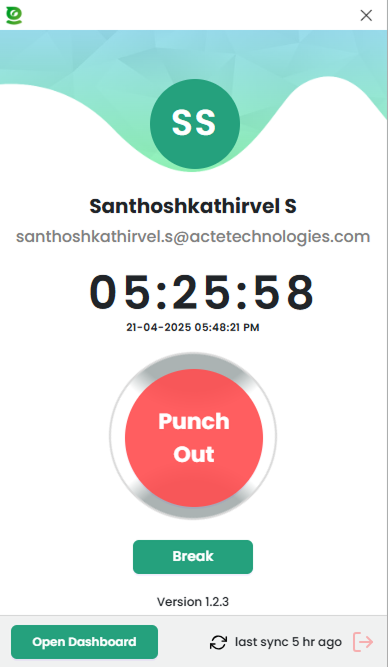
Employees can check-in through multiple methods:
Employees can log their work activities with detailed time tracking:
1. Navigate to "My Activities"
2. Click "Add New Activity"
3. Select project/task from dropdown
4. Enter start/end time or use timer
5. Add description (optional)
6. Save activityTo request time off:
Administrators can manage all user accounts through the Admin Console:
| Feature | Description | Access Level |
|---|---|---|
| Add Employees | Create new user accounts with role assignment | HR Admin |
| Bulk Import | Upload CSV file for multiple user creation | HR Admin |
| Permission Groups | Create custom access levels for different roles | System Admin |
| Department Structure | Organize employees into departments with managers | HR Admin |
The Admin Dashboard provides real-time and historical attendance data:
Generate comprehensive reports with the Report Builder:
Daily, weekly, monthly, or custom date ranges
By department, team, individual, or location
PDF, Excel, CSV, or direct API integration
Automatic calculation based on company policies
| Table | Description | Key Fields |
|---|---|---|
employees |
User accounts and profiles | emp_id, email, role, dept_id, status |
attendance_logs |
Check-in/out records | log_id, emp_id, timestamp, type, device |
activities |
Work activity tracking | activity_id, emp_id, project_id, duration |
leave_requests |
Time off management | request_id, emp_id, status, dates |
departments |
Organizational structure | dept_id, name, manager_id |

Simplified database schema showing primary relationships
All API requests require an API key sent in the X-API-Key header. For user-specific
endpoints, include a JWT token in the Authorization header.
Request Body:
Response:
{
"token": "eyJhbGciOiJIUzI1NiIsInR5cCI6IkpXVCJ9...",
"expires_in": 3600
}| Endpoint | Method | Description |
|---|---|---|
/api/v1/attendance |
POST | Create attendance record |
/api/v1/attendance/{id} |
GET | Get attendance record |
/api/v1/employees |
GET | List employees (paginated) |
/api/v1/reports/attendance |
GET | Generate attendance report |
/api/v1/integration/webhook |
POST | Configure webhook integration |
Configure webhooks to receive real-time events:
attendance.created - New check-in/outleave.requested - Leave application submittedleave.approved - Leave request approvedexception.occurred - Late arrival or missed check-inAll sensitive data encrypted at rest (AES-256) and in transit (TLS 1.3)
Role-based permissions with customizable access levels
Comprehensive logging of all system activities and changes
GDPR, CCPA, HIPAA compliant with data residency options
| Issue | Solution | Error Code |
|---|---|---|
| Check-in failed | Verify internet connection, refresh page, or try mobile app | ATT-400 |
| Login not working | Reset password or contact admin for account unlock | AUTH-403 |
| Missing attendance data | Check filters, ensure correct date range selected | DATA-404 |
| Slow performance | Clear browser cache or try during off-peak hours | SYS-503 |
| API timeout | Verify endpoint URL and check API status dashboard | API-504 |
Administrators can access these tools for troubleshooting:
support@attendance-system.com
Response within 2 business hours
+1 (800) 555-1234
Mon-Fri 8AM-8PM EST
Available in web portal
24/7 for critical issues
Full knowledge base available at
docs.attendance-system.com
For system outages or critical business impact:
